Aetna Health
- 4.3
- Rating
- 1.00M
- Installs
- Free
- Price

 Analysis by App-foxy
I approached Aetna Health as the kind of medical app people open when they are already busy, worried, or trying to make sense of a health-care task from a phone. Developed by Aetna Inc, it is free, rated for Everyone, and designed to bring Aetna-related care management into one place. That sounds simple, but the real test is whether the experience remains understandable when you are tired, dealing with pain, using a small screen, or helping someone else manage their care.
My overall impression is positive, with an important qualification: this is most useful for people whose health-care arrangements already involve Aetna. It is not a general wellness app, a replacement for a clinician, or a universal medical record for every provider you use. Its value comes from reducing the need to jump between separate health-care tasks, provided the information and services you need are available through your Aetna account.
How Aetna Health handles readability and navigation
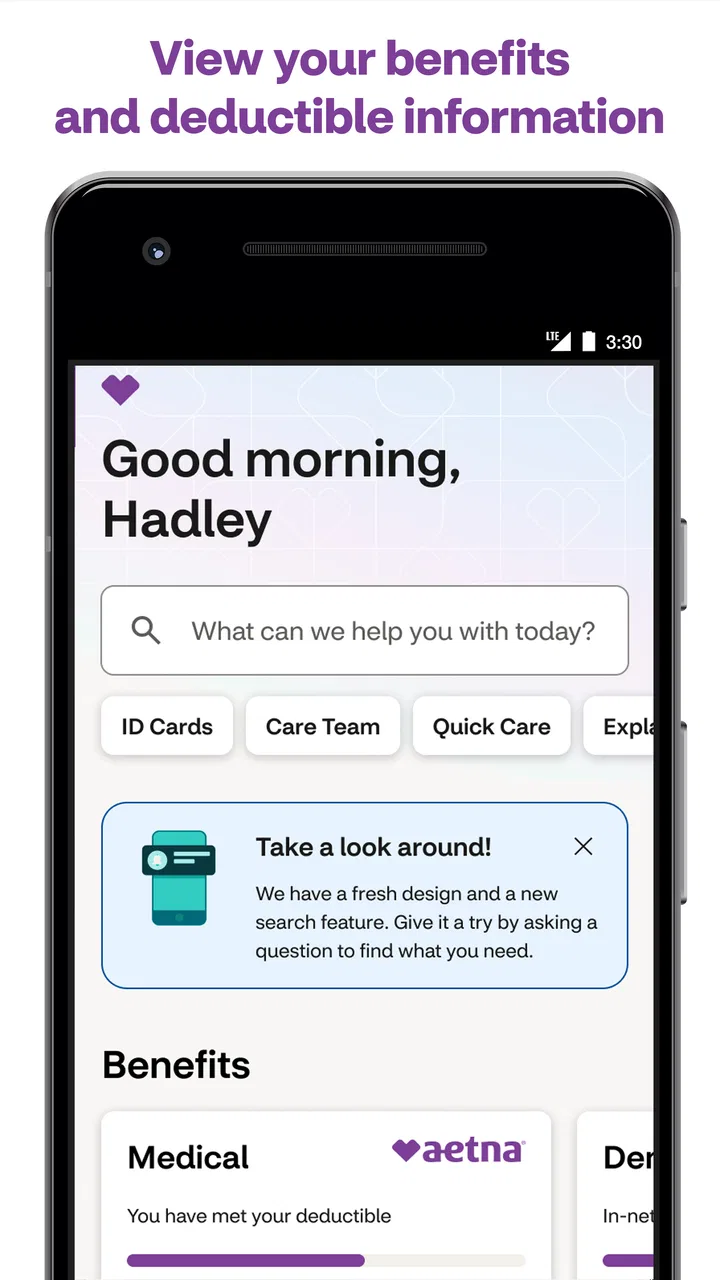
The app’s central idea is easy to understand: manage health care from one mobile location instead of searching through emails, paper documents, and several unrelated services. In everyday use, that focus matters more than a long list of isolated tools. When I am looking for coverage information or trying to complete a practical account task, I want the app to make the next step obvious rather than surround me with medical terminology.
You May Also Like

 Blood Strike: 2.5 Anniversary
Blood Strike’s Loadouts Turn Every Drop Into a Tactical Gamble
A close look at Blood Strike’s custom loadouts: how fast access to signature weapons reshapes its battle royale rhythm, rewards preparation, and narrows the gap between fights.

 Pandora - Music & Podcasts
Pandora’s Music Is Easy to Start, but Harder to Recover
Pandora’s strength is its low-effort path from a seed to a station. Its weak spot is how much confidence it asks you to place in connection, setup, and quiet recovery.

 8 Ball Pool
 Is Built on Rivalries, Rematches, and Routine
A close look at the rivalries, rematches, shared routines, and unanswered safety questions that turn a quick pool match into a persistent mobile community.

 Samsung Music
’s Quiet Strength Is Playing What You Already Own
Its reach comes less from spectacle than from dependable access to a personal library. That simplicity is both the app’s strongest retention engine and its ceiling.

 AccuWeather: Weather Radar
AccuWeather Review: A Quick, Clear Forecast for Everyday Decisions
For everyday plans, the best forecast is the one you can understand quickly. AccuWeather makes rain timing, radar, and local conditions easy to act on, with a few trade-offs.

 Hill Climb Racing
Why Hill Climb Racing Still Turns Crashes Into One More Run
A tiny car, a bumpy hill and one more upgrade: Hill Climb Racing keeps resurfacing because its simple chaos makes every near-miss feel personal.
More From Our News Desk



That makes the interface especially relevant for people who do not enjoy navigating insurance websites. A phone app can feel less intimidating than a desktop portal, particularly when the user only needs to check something quickly. The medical category also sets the right expectation: this is an administrative and care-management companion, not an app that diagnoses symptoms or interprets test results as a doctor would.
One useful habit is to open the app before an appointment, not while standing at the reception desk. I would use that moment to review the account information I may need, identify the relevant section, and make sure I understand what I am looking at. This turns a stressful, time-limited interaction into a short preparation step. It is a small workflow improvement, but it is more valuable than simply downloading an app and hoping it will be useful later.
Readability is not only about font size. It also depends on whether labels make sense to someone who is not familiar with insurance language. A person new to Aetna may need to pause over distinctions between care, coverage, and account-related information. I would not assume that every screen will be self-explanatory just because it is presented in a clean mobile format. When a term affects a financial or treatment decision, checking the wording carefully is still important.
The app has a 4.4 average from around 96 thousand ratings, and it has passed the million-install mark. Those figures suggest that it has reached a substantial audience, but they do not guarantee that every user will find the same parts easy. Health-care apps are unusually dependent on personal circumstances: the plan, the account setup, the type of care being arranged, and the user’s familiarity with insurance all influence the experience.
I also appreciate that the current release is identified as version 7.46.3.252-prod. That is useful when troubleshooting because support staff or a family member helping remotely may ask which release is installed. The minimum operating-system requirement is version 10, so anyone using an older phone should check compatibility before planning around the app. This is a practical accessibility issue: a person may have a perfectly usable handset but still be unable to install or update the app.
Why the mobile format can help
A phone is often closer at hand than a computer, and that can make a difference for users who have limited energy, reduced concentration, or difficulty moving between rooms. I can imagine using Aetna Health from a waiting room, from home after a tiring appointment, or while helping a parent organize a question for a care team. The app’s usefulness is strongest when it removes a small amount of searching and keeps the task in one familiar device.
At the same time, a smaller screen can create its own burden. Long labels, dense pages, or information that requires repeated scrolling are harder to review on a phone than on a large monitor. For someone with low vision or cognitive fatigue, the ability to pause and return later is important. I would avoid opening it during a rushed conversation and instead give myself enough time to read each section without accidentally selecting the wrong option.
For older adults, the deciding factor may be confidence rather than technical skill. A relative can help with the initial setup, then write down a simple routine: open the app, find the needed area, and save any important reference details in an agreed place. That is safer than expecting the user to remember a complex sequence while managing an appointment or prescription question.
Motor and sensory considerations in daily use
People with limited dexterity may find a phone-based health tool convenient because it avoids travel to a computer and can be used from a seated position. However, convenience does not remove the physical demands of tapping, scrolling, typing, and handling authentication steps. If hand tremors, joint pain, or weakness make precise taps difficult, I would use the operating system’s built-in touch and display adjustments where available and keep the phone supported on a stable surface.
This is also an area where a larger device can be better. Someone who struggles to target small controls may prefer using an Aetna web experience on a tablet or computer when that option is available to them. The app is not automatically the most accessible choice simply because it is mobile. The right format depends on whether the person benefits more from portability or from a larger viewing and interaction area.
For users with hearing loss, a text-based account experience may be easier than relying on a phone call for every question. That can reduce the pressure of listening carefully in a noisy environment. Still, an app cannot solve every communication need. If an issue requires direct clarification, a written screen may not provide enough context, and the user may need another support route. I would treat the app as a preparation and management tool, not as a promise that all contact can happen without conversation.
People with low vision should consider display contrast, text enlargement, and screen-reader behavior on their own device. I cannot responsibly treat those operating-system tools as proof that every screen in the app will work perfectly with every assistive setup. My practical advice is to test the most important task early: signing in, finding the relevant account area, and locating the information you expect to use. If that path is difficult, discover it before an urgent appointment rather than during one.
Users with sensory sensitivity may appreciate being able to complete a health-care task privately and at their own pace instead of sitting in a crowded office. On the other hand, notifications, bright screens, or repeated sign-in prompts can become tiring depending on the phone’s settings and the person’s needs. I would adjust notification behavior and screen settings before using the app for regular management, rather than waiting until it becomes an irritation.
A realistic appointment-day scenario
Imagine that I am preparing for a specialist visit and want to avoid arriving without the information connected to my Aetna coverage. The night before, I open the app while I still have time, review the account area relevant to the visit, and note anything I need to ask. If a family member is accompanying me, I can explain the screen in a calm setting instead of trying to navigate while checking in.
That workflow has an accessibility advantage: it separates reading from walking, talking, and making decisions. Someone with memory difficulties can prepare a short written prompt. Someone with limited stamina can complete the task from home. Someone who finds busy environments overwhelming can arrive with fewer unknowns. The app does not need to perform a dramatic medical function to be helpful; reducing avoidable administrative friction can be meaningful.
There is a trade-off, though. I would not rely on a single phone screen as the only record of something important. Phones lose power, accounts can require renewed access, and a user may misread a term when stressed. For a significant appointment, I would keep the necessary details available in a second form and contact the appropriate Aetna or medical support channel if an answer affects care or cost.
Situational access: where the app fits and where it does not
Aetna Health makes the most sense for an Aetna member who wants a mobile starting point for routine health-care management. It can also suit a caregiver who has permission to help a family member, although the exact account and privacy arrangements matter. In that situation, the app may reduce the number of separate websites a helper needs to remember, but it should not encourage casual sharing of passwords or personal health information.
The app is less compelling for someone who has no Aetna relationship, uses several insurers, or wants one neutral dashboard covering every provider and plan. A general health organizer may be better for tracking information across different systems, while a provider-specific patient portal may be the stronger choice for appointment messages, clinical records, or test-related communication. I would choose the tool that matches the task instead of expecting Aetna Health to become a complete medical hub.
It is also not the right first stop for an emergency or a rapidly worsening symptom. A health-insurance app can help with administration, but it is not a substitute for urgent medical services. That distinction is easy to forget when an app is installed under a medical category. I would use it to organize care, not to delay professional help while searching through account screens.
For travelers, the value depends on preparation. A person may be able to use the app away from home, but I would not wait until a weak connection, a dead battery, or an unfamiliar setting creates pressure. Before leaving, I would review what information I might need and make sure I know how to reach help if the app cannot answer the question. This is particularly important for users who rely on a caregiver or who find unexpected digital barriers difficult to overcome.
Families should also think about privacy and independence. Helping someone does not necessarily mean taking over the account. A better approach is to let the person perform the steps when possible, with the helper reading labels aloud, holding the phone steady, or writing down questions. That preserves control and can reveal exactly which part of the process needs support.
Comparing it with the usual alternatives
Compared with calling an insurer, the app can be more convenient for a straightforward task because I can inspect information without waiting on hold. Calling remains better when the wording is confusing, when a situation is unusual, or when I need a person to explain how a decision applies to my individual circumstances.
Compared with a desktop insurance portal, the app wins on portability and quick access. The website may be preferable for extended reading, printing, comparing several pieces of information, or completing a task that feels cramped on a phone. I see the two formats as complementary rather than competitors.
Compared with a hospital or clinic portal, Aetna Health serves a different layer of the health-care experience. A provider portal is generally the natural place for communication tied directly to a medical practice, while an insurer’s app is more relevant to the coverage and member-management side. Confusing those roles can waste time, so I would begin with the app that owns the question.
Compared with a generic health app, Aetna Health has the advantage of being tied to Aetna’s member context. That can make it more relevant for insurance-related tasks, but it also makes it less universal. A person managing care across multiple insurers may prefer a broader system and use this app only when an Aetna-specific matter comes up.
Remaining barriers before I would recommend it widely
The largest barrier is not necessarily the interface; it is the complexity of health insurance itself. Even a well-organized app cannot make every coverage rule, eligibility condition, or care pathway easy to understand. I would be cautious about treating a convenient display as a final interpretation of what will happen medically or financially. When the stakes are high, I would verify the meaning through the appropriate official support route.
Account access can also be a serious obstacle for people who change phones, forget credentials, or depend on another person for digital assistance. A user who has difficulty typing may struggle before reaching the useful part of the app. Preparing login details securely and arranging support in advance can help, but the need for that preparation means the app is not equally effortless for everyone.
Another limitation is the dependence on the phone itself. Small displays, battery concerns, software compatibility, and unreliable connectivity can all affect access. The minimum operating-system requirement of 10 may exclude older devices, which matters for people who cannot replace a phone easily. If the app is central to managing care, I would keep an alternative way to find essential support information.
There is also a human-factor problem: users may assume that everything important must be inside one app because its purpose is to gather health-care management in one place. In practice, care is divided among insurers, clinics, pharmacies, laboratories, and emergency services. Aetna Health can simplify one part of that chain, but it cannot remove the need to know which organization handles each question.
I would skip it if I wanted symptom analysis, exercise coaching, medication reminders as my main goal, or a single cross-provider record. I would also hesitate if I rarely interact with Aetna and prefer handling insurance matters by phone or computer. Installing an app is not automatically an improvement when it adds another account to maintain without solving a recurring problem.
My inclusive verdict after using it as a care-management companion
Aetna Health is a sensible free medical app for Aetna members who want a mobile place to begin routine health-care management. The fact that it is rated for Everyone makes it broadly approachable in age terms, but inclusive design is more than an age label. In my view, its real accessibility value comes from letting people prepare, review information privately, and manage some tasks without traveling to a computer or immediately making a call.
I would recommend it most strongly to people who already know which Aetna-related tasks they need to handle and who are comfortable using a smartphone with their preferred display or interaction settings. It may also help caregivers organize support, as long as privacy and account boundaries are respected. The app’s reach is reflected in its 7.7 thousand reviews and broad adoption, but personal testing still matters because accessibility depends on the user, device, and task.
My advice is to install it before you need it, test one ordinary task, and decide whether the text, navigation, sign-in process, and device controls work for you. Do not wait for an urgent appointment to discover that a larger screen, a phone call, or a caregiver’s assistance would be better. If the app fits your Aetna needs, it can remove a useful layer of friction. If your needs are clinical, cross-provider, or highly personalized, another tool will likely serve you better.
In the end, I see this as a practical companion rather than a complete answer to digital health access. Its strongest promise is organization: bringing relevant Aetna management closer to the person who needs it. Its main weakness is that the surrounding health-care system remains complicated, and mobile access cannot solve every communication, sensory, motor, or account barrier. Used with realistic expectations and a backup plan, it is worth considering for eligible members.
FAQs for Aetna Health
01What features does the Aetna Health app offer?
The Aetna Health app offers a range of features designed to make managing your health care convenient and efficient. It allows users to track claims, manage prescriptions, and access personalized health information. Additionally, the app provides tools to find doctors, book appointments, and view insurance ID cards directly from your smartphone.
02Is my personal health information secure on the Aetna Health app?
Yes, the Aetna Health app takes security very seriously. It uses advanced encryption technologies to protect your personal health information. The app complies with HIPAA regulations, ensuring that your data is handled with strict confidentiality and security standards. Always ensure you keep your login credentials safe.
03Can I use the Aetna Health app without an Aetna insurance plan?
The Aetna Health app is specifically designed for Aetna members, so you need an active Aetna insurance plan to access its full range of features. However, some general health resources and tools might be available to non-members, but the app is primarily tailored for those with Aetna coverage.
04How do I find a doctor using the Aetna Health app?
Finding a doctor with the Aetna Health app is straightforward. Simply use the 'Find Care' feature, which lets you search for doctors, hospitals, and specialists covered under your plan. You can filter results by location, specialty, and even read reviews. This feature helps ensure you find the right care within your network.
05What devices are compatible with the Aetna Health app?
The Aetna Health app is compatible with most modern smartphones and tablets. It is available for download on both Android and iOS platforms. Ensure your device has the latest operating system updates for optimal performance. Check the app store on your device for the latest compatibility details and download options.
Pros
- Intuitive user interface for easy navigation.
- Comprehensive health tracking features.
- Access to personalized health insights.
- Seamless integration with wearable devices.
- Real-time updates on insurance claims.
Cons
- Limited availability for non-Aetna members.
- Some features require premium subscription.
- Occasional syncing issues with devices.
- Customer support can be slow at times.
- Requires frequent updates for bug fixes.

Aetna Health
Gallery